-
CATALOGUES, COMMANDES & STOCKS
-
-
-
- Associer une catégorie ou sous-catégorie à un acte
- Automatiser le marquage "Stérilisé", "Hongre" ou "Décédé"
- Comment utiliser la section « Détail affiché sur la facture » des actes/procédures ?
- Créer et utiliser les déclinaisons de prix sur vos actes
- Paramétrer une remise maximale pour un acte ou un produit
- Qu'est ce que la désignation commerciale d'un acte ou d'un produit ?
-
-
-
- Ajouter l'AMM d'un produit
- Ajouter la ou les substance(s) active(s) d'un produit
- Ajouter les données pharmacologiques d'un produit à partir d'une source de données (ANSES France)
- Ajouter les voies d'administration d'un produit
- Ajouter une posologie pré-enregistrée pour un produit
- Données pharmacologiques d'un produit
- Produit inexistant dans le référentiel proposé
- Renseigner le déconditionnement des données pharmacologiques d'un produit
- Renseigner les données pharmacologiques d'un produit
- Renseigner les précautions d'un produit
- Renseigner les temps d'attente d'un produit
-
- Ajouter des produits dans mon catalogue à partir du catalogue des centrales
- Ajouter un produit CDMV non accessible depuis la fonction “importer produit centrale”
- Archiver ou supprimer un produit de votre catalogue
- Créer et ajouter un produit sans passer par le catalogue d’une centrale d’achat
- Importer des produits CDMV
-
- Associer une catégorie ou sous-catégorie à un produit
- Créer des déclinaisons de prix pour mes produits
- Déconditionner un produit
- Générer des codes-barres pour les produits qui n’en ont pas
- Masquer un produit sur mes ordonnances, factures, devis ou étiquettes
- Notion d’état pour les produits
- Paramétrer une remise maximale pour un acte ou un produit
- Stopper la synchronisation du prix d’un produit (imposer un prix fixe à un produit)
- Utiliser une douchette dans Vetup
-
-
-
- Afficher les numéros de lots sur l’ordonnance
- Archiver un numéro de lot
- Comportement de la case Gestion des lots
- Enregistrer un numéro de lot et une date d’expiration pour un produit
- Lier sa gestion de lot avec sa gestion de stock (case Gestion obligatoire des numéros de lot pour les stocks)
- Paramétrage de la sélection des numéros de lots
- Rendre obligatoire les informations de lot pour la facturation
-
-
-
COMMUNICATION CLIENT
-
- Consulter ma consommation de SMS/EMAIL
- Désabonnement des emails Vetup
- Gérer les préférences de communication client
- Réduire sa consommation de SMS
-
- Activer les rappels automatiques
- Décocher automatiquement le mode courrier si les modes Email et/ou SMS sont disponibles
- Envoyer un sms en notant l’indicatif pays
- Paramétrer un nom d’expéditeur pour vos SMS
- Pouvoir visualiser rapidement en consultation si un rappel est prévu ou non (pour un acte et/ou un produit)
- Utiliser les « Rappels sans consultation ultérieure »
- Visualiser les rappels envoyés ou programmés
-
FAQ
-
FINANCES
-
- Consulter toutes vos factures non clôturées
- Création d'une facture
- Créer toutes les factures d’un client sur une période donnée
- Créer une facture groupée pour la visite de plusieurs animaux d'un même propriétaire
- Différence entre facture enregistrée (= éditée) et facture clôturée
- Éditer une facture à un nom différent de celui figurant sur la fiche client
- Envoyer une facture au client ou à votre confrère
- Facture générée par un devis + acompte
- Transmettre une facture lors d'un règlement
- Utiliser les QR factures
-
-
- Effectuer un règlement pour une visite
- Gérer un trop perçu
- Gérer un trop peu perçu
- Historique de caisse
- Modifier un mode de règlement suite à un encaissement
- Notion de paiement déposé ou non en banque
- Règlement de plusieurs factures
- Supprimer un remboursement
- Utiliser un avoir pour payer une visite ou un achat
-
-
GESTION & PARAMÉTRAGES
-
-
- Articles à venir
-
- Articles à venir
-
- Articles à venir
-
-
- Accéder au planning depuis l'agenda
- Accéder facilement à un jour précis dans l’agenda
- Indiquer qu’un rendez-vous a été annulé par un client
- Repérer facilement la date et l’heure du jour dans l’agenda
- Voir les détails d'un rendez-vous de l'agenda
- Voir les détails d’une fiche client ou animal depuis la page de prise de rendez-vous
-
- Créer un rendez-vous dans l’agenda Vetup
- Créer un rendez-vous récurrent
- Créer un type de rendez-vous
- Définir un type de rendez-vous par défaut dans l’agenda
- Dupliquer un rendez-vous
- Envoyer un SMS ou Email personnalisé depuis un rendez-vous
- Paramétrer la durée des rendez-vous par type de rendez-vous
- Paramétrer la durée des rendez-vous par utilisateur
- Passer un client en salle d'attente
-
-
- Afficher le numéro de téléphone de la clinique dans l'en-tête de vos documents
- Ajouter ou modifier le logo de ma clinique sur tous mes documents
- Ajouter un pied de page à vos documents
- Intégrer une signature manuscrite sur les comptes-rendus et ordonnances
- Modifier le nom de ma clinique
- Modifier les informations d'en-tête de vos documents (hors facturation)
- Utiliser la saisie vocale
-
- Ajouter un produit sur une ordonnance déjà enregistrée
- Clôturer une ordonnance
- Clôturer une prescription (Canada)
-
- Archiver ou réactiver un utilisateur du logiciel Vetup
- Changement rapide d’utilisateur par code pin
- Créer un nouvel utilisateur
- Gestion des droits des utilisateurs
- Limiter l’accès à Vetup par adresse IP
- Modifier la licence d’un utilisateur
- Modifier mon mot de passe Vetup
- Paramétrer la durée des rendez-vous par utilisateur
- Pourquoi créer un utilisateur avec la licence “agenda” ?
-
- Articles à venir
-
-
- Affichage des rappels en cours depuis une visite
- Ajouter des actes, produits ou packs à une visite
- Associer obligatoirement un nom de praticien à une ligne de facturation
- Clôturer un examen médical
- Clôturer une visite
- Effacer plusieurs lignes de facturation d’une visite
- Modifier la date de consultation, des actes et des produits
- Pouvoir envoyer facilement l'examen médical d'une visite
- Utiliser les statuts de visite
-
- Articles à venir
-
- Changer l'unité monétaire de votre compte
- Comment renseigner l’onglet PRODUITS des PARAMÈTRES GÉNÉRAUX
- Formatage des noms de famille, adresses, … des fiches clients
- Paramétrage des exports CSV
- Paramétrage des possibilités de suppression d’une visite
- Paramétrer l’affichage des tarifs catalogue en HT ou TTC
- Paramétrer l’agenda aux horaires d’ouverture de la clinique
- Paramétrer la clôture de mes factures
- Paramétrer une unité de poids sur votre compte
- Paramétrer une unité de taille sur votre compte
- Paramètres d’impression
- Personnaliser les couleurs de votre compte
-
-
MÉDICAL
-
- Actions possibles depuis la fiche d'un animal
- Archiver une fiche animal
- Consulter les dernières vaccinations d’un animal
- Consulter tous les rendez-vous des animaux d’un même propriétaire
- Déplacer un animal vers un autre propriétaire
- Extraire et transmettre l’historique détaillé d’un animal
- Fusionner des doublons de fiches pour un même animal
- Historique des consultations / visites
- Marquer un animal comme décédé
- Retrouver le dossier d'un animal grâce à son numéro d'identification
-
- Archiver une fiche client
- Comprendre le solde client
- Consulter facilement tous les contacts d’un client
- Créer des catégories clients
- Créer plusieurs animaux dans une fiche client
- Obtenir un export de ma base clients
- Où trouver l’historique des factures sur une fiche client
- Réserver un produit pour un client
-
- Ajout d’un commentaire à côté de chaque numéro de téléphone
- Ajouter un tag
- Ajouter une adresse email sur une fiche client
- Configurer et gérer les consentements clients pour la protection des données (RGPD / GDPR / CASL)
- Créer un nouveau client
- Indiquer qu'un client est professionnel ou particulier
- Message associé à la saisie d’une adresse mail incorrecte
- Utiliser les informations utiles des fiches client / animal
-
-
PRÉSENTATION DU LOGICIEL & NOUVEAUTÉS
-
- Étapes à suivre pour gérer un import de données d’un ancien logiciel vers Vetup
- Paramétrages possibles avant un import définitif
-
- Articles à venir
-
-
- Articles à venir
-
- Articles à venir
-
-
- Communication concernant la version 1.1.58 de Vetup
- Communication concernant la version 1.1.59 de Vetup
- Communication concernant la version 1.1.60 de Vetup
- Communication concernant la version 1.1.61 de Vetup
- Communication concernant la version 1.1.62 de Vetup
- Communication concernant la version 1.1.63 de Vetup
- Communication concernant la version 1.1.64 de Vetup
- Communication concernant la version 1.1.65 de Vetup
- Communication concernant les mises à jour Vetup – 1.1.67.23
SmartCapture (EN)
Integrated into Vetup, SmartCapture analyzes your clinical records against invoices to identify missing procedures, detect revenue losses, and indicate where action is needed.
🔹 How to subscribe
From the shortcuts bar, click on the APPLICATIONS logo, then on NOVA VET.
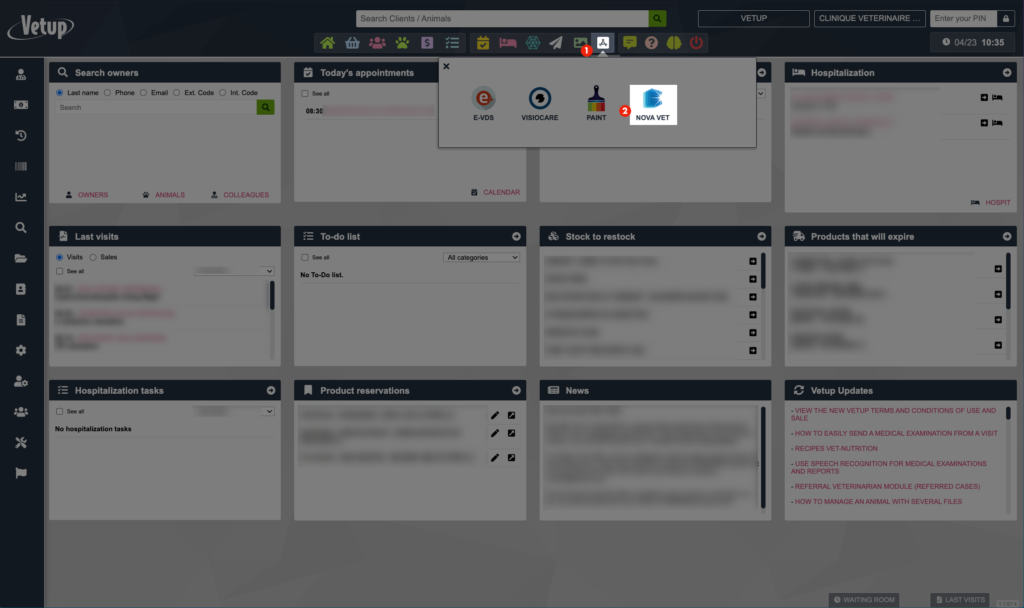
A window opens, and your organization’s information is automatically filled in. Enter your Currency and the Administrator user.
⚠️ The administrator user must have an email address specified in their user profile.
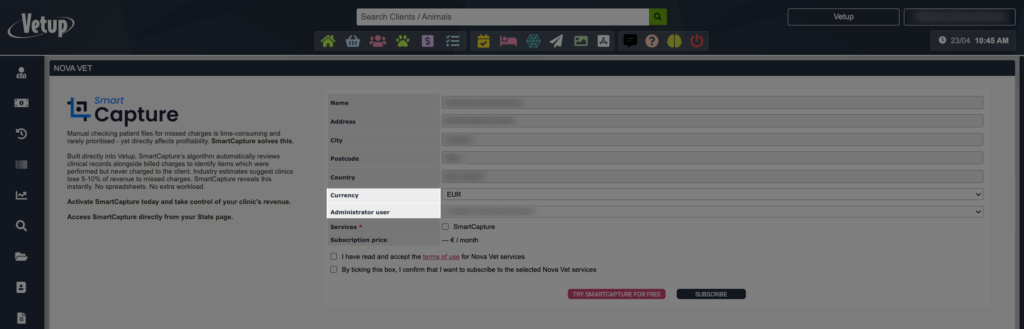
Then select the SmartCapture service by checking the corresponding box.
The subscription price is automatically updated based on the number of veterinary user licenses on your Vetup account.
📌 The subscription price is fixed beyond 4 active veterinarians. For example, if your Vetup account has 5 or 10 active veterinary licenses, the same rate will apply.
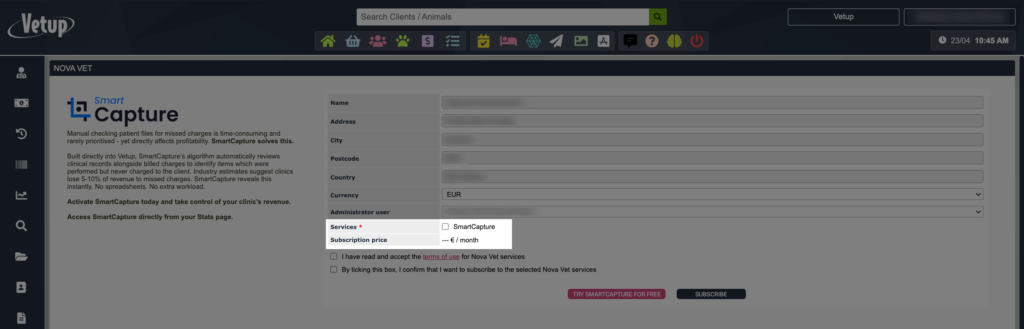
To set up the subscription, you will need to accept the Nova Vet service terms of use.
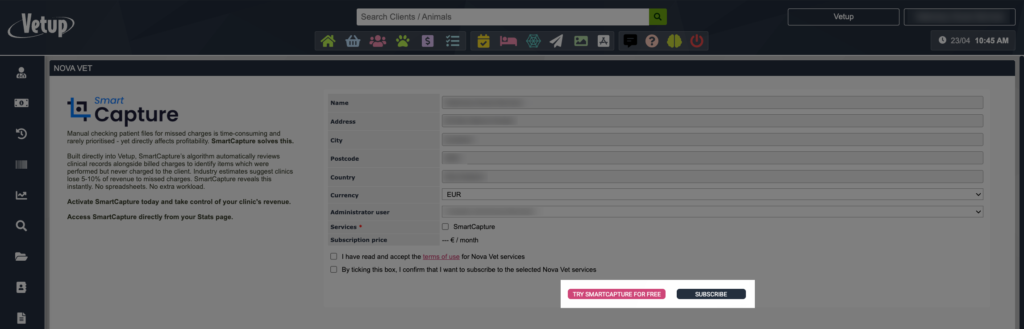
Then click on SUBSCRIBE.
😉 It is also possible to start a free trial of SmartCapture. This trial will allow you to analyze your data once.
🔹 Start an audit
From STATS, click on SmartCapture.
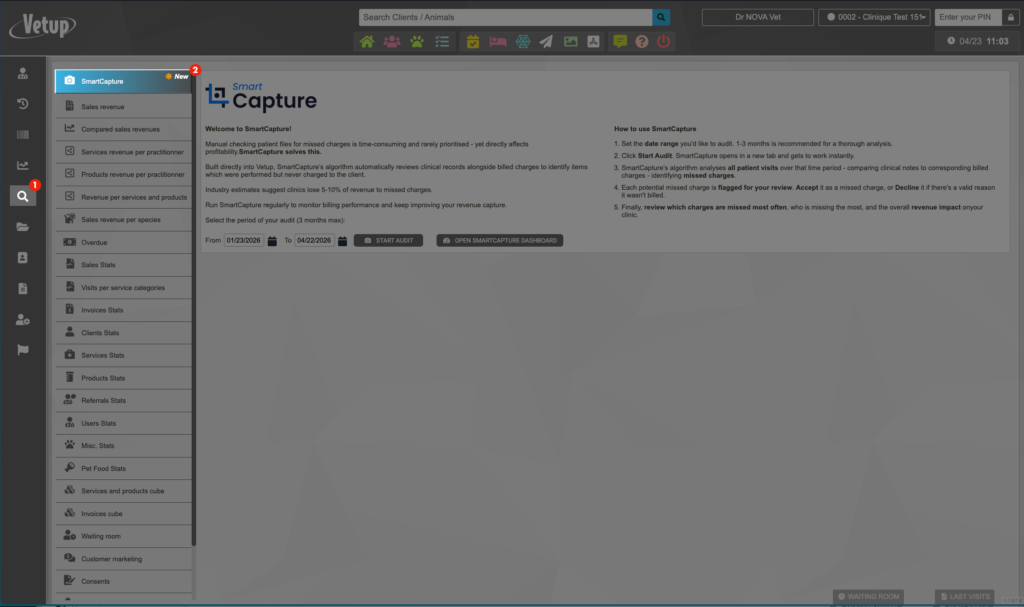
Select the period for your audit (maximum 3 months), then click on START AUDIT.
📌 A period of 1 to 3 months is recommended for an in-depth analysis.
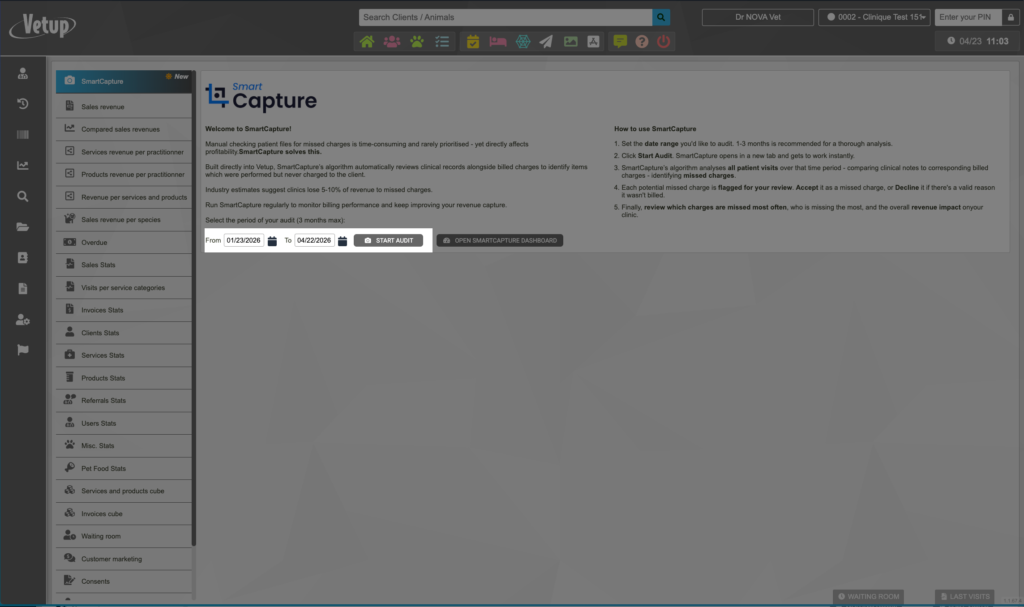
SmartCapture opens in a new tab and immediately begins the analysis, comparing clinical notes with the corresponding billed procedures to identify anomalies.
The SmartCapture algorithm analyzes all consultations over the selected period, comparing clinical notes with the corresponding billed procedures to detect any discrepancies.
Each potentially unbilled procedure is flagged for review. You can accept it or mark it as a “false positive” if there is a valid reason why it was not billed.
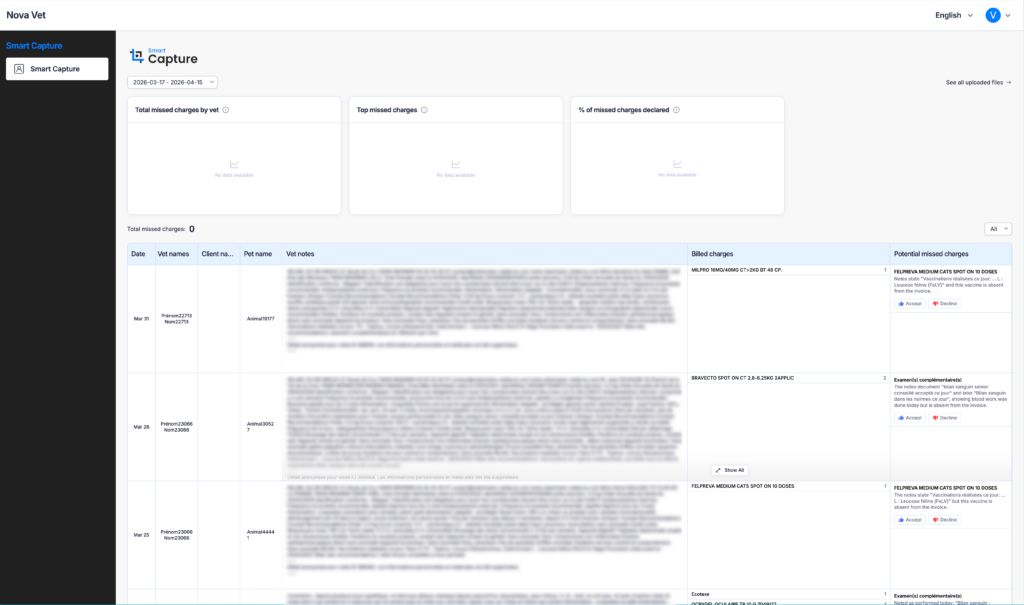
See which procedures are most often missed, who misses the most, and the impact on your clinic’s revenue.
